Ask any packaging manager where their projects lose the most time, and the answer is rarely artwork design. It's the packaging approval process.
A file goes out for review. Someone replies over email with comments buried in the message body. Someone else annotates a PDF and sends it back as a new attachment. A third reviewer opens an older version by mistake and approves changes that were already rejected. By the time the artwork is print-ready, nobody can say with certainty which version was approved, by whom, or why a change was made in the first place.
This is the reality in most organizations because artwork approval workflows are rarely designed. They evolve. Email threads become the process. Shared drives become the version control system. Follow-ups become the escalation mechanism. It works, until volume increases, timelines shrink, or a regulator asks for a full audit trail.
The good news is that artwork approval delays are rarely a people problem. They're a workflow design problem and workflow design can be improved through a set of well-defined principles, regardless of your company's size, industry, or approval hierarchy.
What makes an effective artwork approval workflow?
Before getting into specific practices, it helps to define what "good" actually looks like. An effective artwork approval workflow is:
Repeatable - the same type of change follows the same path every time, not a different one depending on who's driving it.
Transparent - anyone involved can see where an approval stands without asking.
Traceable - every decision, comment, and version change is recorded, not scattered across inboxes.
Standardized - review criteria and approval stages are defined once and applied consistently.
Collaborative - reviewers can comment and resolve feedback in one place, not across parallel email chains.
Scalable - the process holds up whether you're approving 10 SKUs a month or 500.
Audit-ready - at any point, you can reconstruct exactly what happened and prove it.
Most packaging teams have some of these. Very few have all of them. That gap is usually where delays, rework, and compliance risk live.
Artwork Approval Workflow Guidelines
- Standardize the approval workflow
When every product line or brand team runs its own informal approval process, delays multiply and nobody outside that team can predict how long approval will take. Define a standard workflow—stages, reviewers' roles, and expected turnaround per stage and apply it consistently, so every artwork follows the same predictable path.
- Maintain a single source of truth
When artwork lives across email attachments, shared drives, and local folders, reviewers inevitably work from different versions. Every reviewer should access the current artwork from a single controlled repository rather than shared folders or email attachments.
- Build version control into every approval
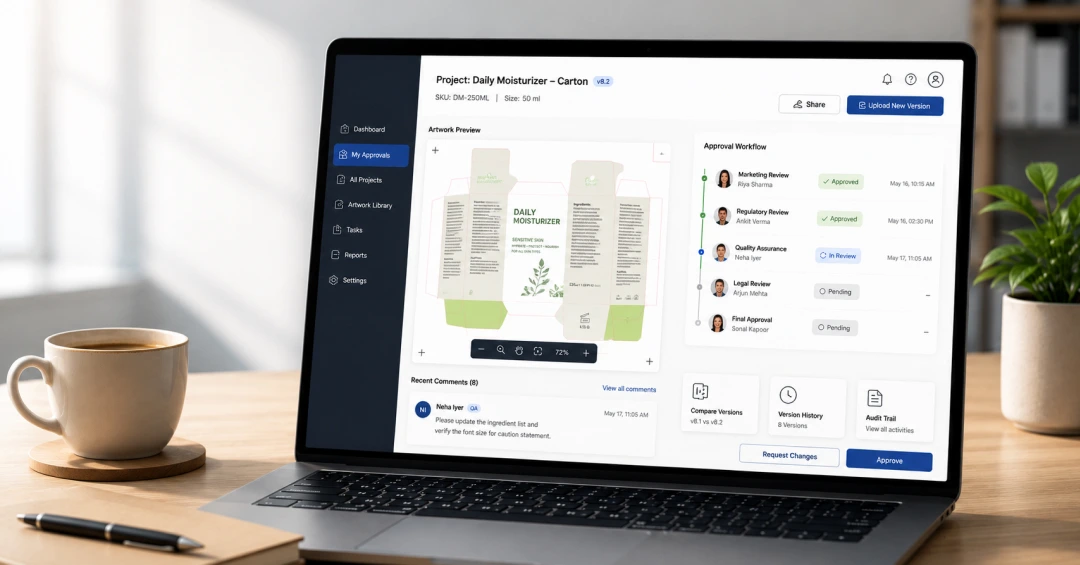
An artwork approval is only meaningful if it's tied to a specific version. Without this, teams end up approving comments on outdated files or, worse, printing an unapproved version by mistake. Every review and sign-off should be locked to a version number automatically, so an approval can never be separated from the exact file it was given for.
- Separate review from approval
Review and approval are not the same activity. Review is about gathering feedback; approval is a formal sign-off that the artwork is correct and ready to proceed. Blurring the two creates ambiguity about whether a "looks good" comment counts as final sign-off. Design the workflow with distinct feedback and approval stages, each with its own criteria for what "complete" means, so nobody has to guess whether a comment was casual input or a formal decision.
- Standardize change requests
Vague feedback like "fix the color" or "recheck the text" leads to guesswork and multiple rounds of rework. Change requests should specify exactly what needs to change, where on the artwork, and why — pinned to a precise location rather than described in prose. A standardized comment format turns feedback into something the design team can act on immediately, instead of something they have to interpret first.
- Reduce unnecessary review cycles
Every additional reviewer and every redundant review round adds time without necessarily adding value. Map out who genuinely needs to review at each stage and remove reviewers who are there out of habit rather than necessity. A workflow should be deliberately scoped, not something that quietly grows an extra reviewer or an extra round every few months because nobody revisited it.
- Automate routing and reminders
Manual follow-ups like "just checking if you've had a chance to review this" are a symptom of a workflow that doesn't manage itself. Packaging artwork should route automatically to the next reviewer once a stage is complete, with reminders triggered on their own — not because someone remembered to send a nudge, but because the workflow is designed to move without needing a human to push it forward.
- Maintain complete approval history
If you can't show who approved what, when, and against which version, you don't have an audit-ready process, no matter how sound your actual decisions were. Every approval, rejection, and comment should be logged automatically and remain retrievable. So, history exists as a byproduct of the workflow itself and not as documentation; someone must reconstruct after the fact when an auditor or a regulator asks for it.
- Design workflows that can scale
A process that works for 5 SKUs a month often breaks at 50. If your workflow depends on one person tracking everything manually, it won't hold up as volume grows. Build workflows around defined rules and automation rather than individual oversight; the rules should do the scaling, not a person remembering to keep up.
- Measure workflow performance
You can't improve what you don't measure. Track cycle time, approval turnaround, number of review rounds, and where the packaging approval workflow consistently slows down. Treat the workflow as something to keep tightening based on that data, not a process you design once and never revisit.
Putting these guidelines into practice
These principles aren't theoretical. Organizations that standardize their approval workflows consistently reduce approval delays, improve first-time-right rates, and strengthen audit readiness.
That's exactly what CavinKare achieved by redesigning their packaging artwork approval process with ManageArtworks—reducing artwork approval cycle time from 79 days to 12 days while increasing first-time-right approvals from 20% to 60%.
The takeaway is simple: faster approvals don't come from adding more reviewers or chasing more follow-ups. They come from building a workflow that's standardized, transparent, and designed to scale.
Frequently Asked Questions
A well-defined packaging approval process reduces approval delays, prevents version confusion, minimizes costly artwork errors, improves collaboration across teams, and helps organizations meet regulatory and audit requirements.
Best practices include standardizing approval stages, maintaining a single source of truth, implementing version control, separating review from approval, automating routing and reminders, tracking workflow performance, and maintaining a complete approval history.
Organizations can reduce approval cycle time by automating workflow routing, eliminating unnecessary review stages, standardizing approval criteria, centralizing artwork files, and monitoring workflow metrics to identify bottlenecks.


.webp)